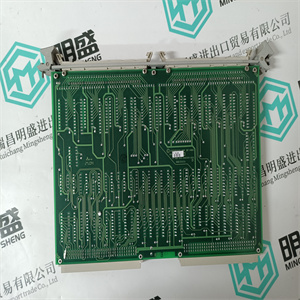
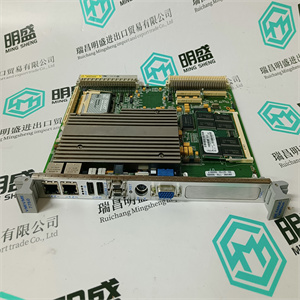
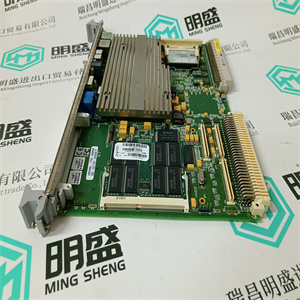




产品标题:Mita-Teknik 用于驱动控制卡 912302302 WP3023 PCB97004L
型号: 用于驱动控制卡 912302302 WP3023 PCB97004L
品牌:Mita-Teknik
质保:七天验收期,质保期一年
发货期:1-3个工作日
产品图片展示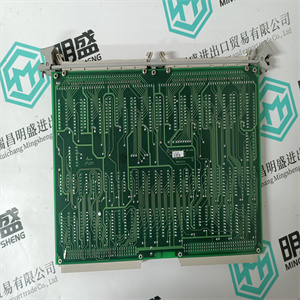
产品详情资料
在具有控制器节点73和74的节点中。
4.在“对象类型”区域中分别选中DI和DO复选框。
这两种对象类型共有的属性以绿色显示
(红色不常见,无法在属性中选择
区域)。见图11。
5.单击Properties(属性)区域中的error state(ERR)属性和文本
“属性1”文本字段中将显示ERR,后跟“=”。
6.在Property1文本字段中键入“1”或“TRUE”。7.单击列表中的AL_UNACK属性,然后在property 2文本字段中输入“1”或者“TRUE”(按CR)。如何使用快速列表第5节快速列表
28 3BSE030352-6008。将文本字段Node1更改为“73”,Node2更改为“74”。单击应用以存储配置。现在配置应该如图11所示。图11。快速列表配置示例。
属性“STATUS_DO/”接受十六进制值。例如:/H:5''第5节快速列表如何使用快速列表
3BSE030352-600 299。要显示结果,只需切换到主视图,搜索将自动启动。请参见图12。图12。主视图如果服务关闭或RTA板未正确配置,则会收到错误消息:“连接失败”。非法搜索选项将显示消息:“输入的propertymatch值的语法非法”。要停止搜索,请单击取消或选择配置视图。要打印搜索结果,请单击“打印”。要开始新的搜索,请单击搜索。配置示例第5节快速列表30 3BSE030352-600配置示例示例1列出节点5、6和7中进程部分2的所有模拟输入(AI),这些输入在名称中的位置7-10处有字符串“Temp”,处于报警状态并阻止报警处理。1.单击对象类型列表中AI的复选框。可用于搜索的AI属性显示在可用属性的列表视图中。2.将指针放在Section1文本字段上并输入值“2”。3.在Node1到Node3文本字段中输入值“5”到“7”。4.选择Object name文本字段并输入“温度。六个问题
标记意味着前六个字符可以是任何字母数字字符。
将光标移动到另一个字段。
5.使用Property1的文本字段。当模拟信号处于报警状态时
标志DISTURB(干扰)设置为高。指定所需的条件
属性1-属性4:in the nodes with controller node 73 and 74.
4. Select the DI and DO checkbox respectively in the Object Type area.
The properties common to both these object types are shown in Green color
(Red colored are not common, and are not possible to select in the Properties
area). See Figure 11.
5. Click on the property for error state (ERR) in the Properties area and the text
ERR followed by a “=” appears in the Property1 text field.
6. Type “1” or “TRUE” in the Property1 text field.7. Click on the AL_UNACK property in the list and type “1” or “TRUE” to theProperty2 text field (press CR).How to use the Quick List Section 5 Quick List
28 3BSE030352-6008. Change the text fields Node1 to “73” and Node2 to “74”. Click Apply to storethe configuration. Now the configuration should look like Figure 11.Figure 11. Quick List Configuration Example.
The property ‘’STATUS_DO /’’ accepts hexadecimal values. For example:/H:5’’Section 5 Quick List How to use the Quick List
3BSE030352-600 299. To present the result, just change to the Main view and the search will startutomatically. See Figure 12.Figure 12. Main ViewIf the service is down or the RTA board is not properly configured you get theerror message: ‘’Connect Fail’’.An illegal search option will give the message: ‘’Syntax of entered propertymatch value is illegal’’.To stop the search, click Cancel or select the Config View.To print the search result, click Print.To start a new search, click Search.Configuration Examples Section 5 Quick List30 3BSE030352-600Configuration ExamplesExample 1List all Analog Inputs (AI) of process section 2 in the nodes 5,6, and 7, which hasthe string “Temp” in position 7-10 in the name and are in a state of alarm and havethe alarm processing blocked.1. Click the check box for the AI in the Object Type List. The properties of AIwhich are available for searching are displayed in the list view for availableproperties.2. Place the pointer on the Section1 text field and enter the value ‘2’.3. Enter the values ‘5’ to ‘7’ in the Node1 to Node3 text fields.4. Select the Object name text field and enter ‘??????Temp’. The six question
marks mean that the first six characters may be any alphanumeric characters.
Move the cursor to another field.
5. Use the text field for Property1. When an analog signal is in state of alarm, the
flag DISTURB (disturbance) is set high. Specify the conditions you want for
Property1 - Property4:
主营产品简介
专注于DCS、PLC、机器人控制系统、大型伺服四大系统领域。
主营产品各种模块/卡件,控制器,触摸屏,伺服驱动器。
优势:供应进口原装正品,专业停产配件,
发货快,货期精准,
主营品牌包括 ABB贝利、GE/FUANC、FOXBORO、英维思TRICONEX 、本特利BENTLY、A-B罗克韦尔、艾默生EMERSON 、OVATION、MOTOROLA、XYVOM、霍尼韦尔HONEYWELL 、力士乐REXROTH、KUKA、NI、DEIF、横河、伍德沃德WOODWARD、瑞恩、施耐德SCHNEIDER 、安川、 穆格MOOG、PROSOFT等品牌
Copyright ©2019-2022 瑞昌明盛自动化设备有限公司 版权所有 赣ICP备2021006016号






