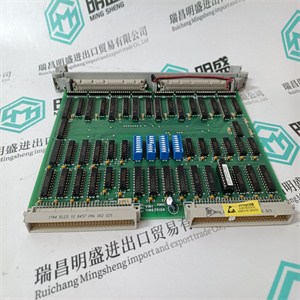
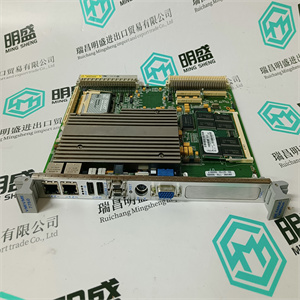
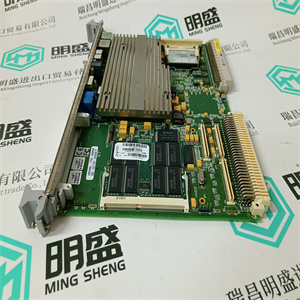




产品标题:XTCE750N22A DIL M750 用于伊顿塑壳断路开关接触器 EATON
型号:XTCE750N22A DIL M750 用于伊顿塑壳断路开关接触器
品牌: EATON
质保:七天验收期,质保期一年
发货期:1-3个工作日
产品图片展示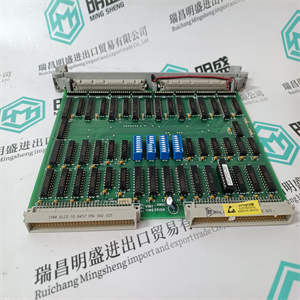
产品详情资料
示例1在节点5、6和7中列出过程段2的所有模拟输入(AI),这些输入在名称中的位置7-10处有字符串“Temp”,处于报警状态并阻止报警处理。1.单击对象类型列表中AI的复选框。可用于搜索的AI属性显示在可用属性的列表视图中。2.将指针放在Section1文本字段上并输入值“2”。3.在Node1到Node3文本字段中输入值“5”到“7”。4.选择Object name文本字段并输入“????”??????温度。这六个问号意味着前六个字符可以是任何字母数字字符。将光标移到另一个字段。5.使用属性1的文本字段。当模拟信号处于报警状态时,标记DISTURB(干扰)设置为高。指定Property1-Property4:–单击可用属性列表中的标签DISTURB。text'DISTURB='被复制到一个自由文本字段。将值“1”或“TRUE”添加到文本字段。6.报警阻止属性称为AL_BLK,编号为4。通过单击属性列表中的标签AL_BLKK,在Property2文本字段中输入此属性,并将“1”添加到Property2中文本字段。7.现在已定义列表的所有必要参数,现在可以激活搜索条件。单击应用按钮保存配置数据。5节快速列表配置示例3BSE030352-600 31
示例2列出节点7、8和9、工艺部分3、1级或2级中的所有电机
以下任何模式:LOCAL(本地)、TEST(测试)或STAND BY(备用)。所有电机控制装置都有
已使用对象类型MOTCON实现。
1.单击对象类型列表中代表MOTCON的复选框。
复选框表示活动参数。的可访问属性
MOTCON出现在可用属性列表中。选择Node1文本字段
并输入值“7”。将光标移动到节点2文本字段。
2.在Node2文本字段中输入值8。将光标移动到Node3文本字段
然后输入值9。
3.将光标移到Section1Example 1List all Analog Inputs (AI) of process section 2 in the nodes 5,6, and 7, which hasthe string “Temp” in position 7-10 in the name and are in a state of alarm and havethe alarm processing blocked.1. Click the check box for the AI in the Object Type List. The properties of AIwhich are available for searching are displayed in the list view for availableproperties.2. Place the pointer on the Section1 text field and enter the value ‘2’.3. Enter the values ‘5’ to ‘7’ in the Node1 to Node3 text fields.4. Select the Object name text field and enter ‘??????Temp’. The six questionmarks mean that the first six characters may be any alphanumeric characters.Move the cursor to another field.5. Use the text field for Property1. When an analog signal is in state of alarm, thelag DISTURB (disturbance) is set high. Specify the conditions you want forProperty1 - Property4:– Click on the label DISTURB in the list of available properties. The text‘DISTURB = ’ is copied to the first free text field. Add the value ‘1’ orTRUE’ to the text field.6. The alarm blocking property is called AL_BLK and has the number 4. Enterthis property in the Property2 text field by clicking on the label AL_BLK inthe property list and add ‘1’ to the Property2 text field.7. Now all the necessary parameters of the list are defined and the search criteriacan now be activated. Click the Apply button to save the configuration data.Section 5 Quick List Configuration Examples3BSE030352-600 31
Example 2List all the motors in node 7, 8 and 9, process section 3, class 1 or 2, which are in
any of the following modes: LOCAL, TEST or STAND BY. All motor controls have
been implemented by using the object type MOTCON.
1. Click on the check box representing MOTCON in the list for object types.
A checked box signifies an active parameter. The accessible properties of
MOTCON appear in the list of available properties. Select the Node1 text field
and enter the value ‘7’. Move cursor to the Node2 text field.
2. Enter the value 8 in the Node2 text field. Move cursor to the Node3 text field
and enter the value 9.
3. Move the cursor to the Section1
主营产品简介
专注于DCS、PLC、机器人控制系统、大型伺服四大系统领域。
主营产品各种模块/卡件,控制器,触摸屏,伺服驱动器。
优势:供应进口原装正品,专业停产配件,
发货快,货期精准,
主营品牌包括 ABB贝利、GE/FUANC、FOXBORO、英维思TRICONEX 、本特利BENTLY、A-B罗克韦尔、艾默生EMERSON 、OVATION、MOTOROLA、XYVOM、霍尼韦尔HONEYWELL 、力士乐REXROTH、KUKA、NI、DEIF、横河、伍德沃德WOODWARD、瑞恩、施耐德SCHNEIDER 、安川、 穆格MOOG、PROSOFT等品牌
Copyright ©2019-2022 瑞昌明盛自动化设备有限公司 版权所有 赣ICP备2021006016号






