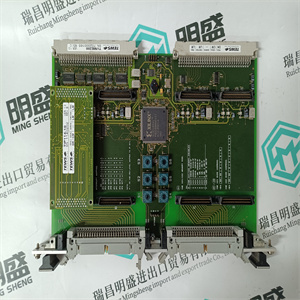
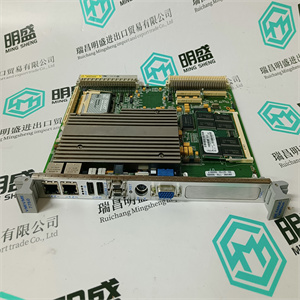
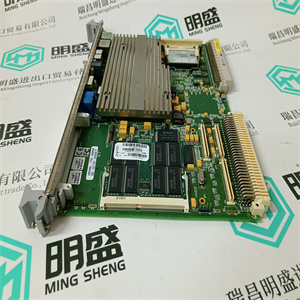




产品标题:N4BD TEBIT 1KHL015502R0006 用于驱动控制器主板 ABB
型号:N4BD TEBIT 1KHL015502R0006 用于驱动控制器主板
品牌: ABB
质保:七天验收期,质保期一年
发货期:1-3个工作日
产品图片展示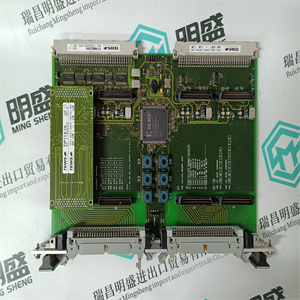
产品详情资料
1.根据F 7553数据表中的注释设置模块上的解码开关,
2.插入并固定模块,
3.打开模块(WD开关置于“on”位置),
4.按下中央模块上的ACK键,直到显示屏上出现RUN信息。
8.2.3中央模块(CU)
删除:
1.卸下数据电缆插头的螺钉,
2.卸下数据线,
3.完全拆下模块的固定螺钉,它们必须可以自由移动!
4.通过弹射杆不间断地将模块与总线板分离
(前标签)以防止系统中的错误信号触发关机。
然后可以拆下模块。
5.请勿触摸模块组件!注意CMOS组件的ESD规则。
插入:
1.根据数据检查开关和跳线的设置
床单
2.完全拆下前板的固定螺钉,直到达到极限,
3.将模块安装到连接器上,然后不间断地插入,直到停止,以防止系统中出现故障信号,
4.固定螺钉,
5.插入数据电缆并固定其螺钉。
8.2.4电源
删除:
1.检查电源F 7126、F 7130A和监控模块上的LED
F 7127、F 7131(发光LED指示正确的模块,暗LED指示有缺陷
单元只更换有缺陷的模块,否则PES将关闭!)
2.如果LED熄灭,检查24 VDC馈电。
3.在拆除故障电源F 7126、F 7130A之前,检查所有电源的输出电压
其他电源(参见数据表)。
4.拧下故障电源并将其拆下。
插入:
1.插入电源并用螺钉固定,
2.检查输出电压(参见数据表)。
注:如果在未关闭的情况下拆除模块
所有I/O子架均已关闭。这将导致MS和
HS系统。
注:在冗余系统中,新插入的中央模块必须具有
操作系统版本与已插入的中央处理器相同
单元如果不是这样,显示屏上会显示一条错误消息
新插入的中央模块,此模块将进入
停止状态。那么相应的操作系统版本必须
加载。因此,请注意操作中的信息
系统手册。
安装和连接
31
8.2.5通信和协处理器模块
删除:
1.断开通信电缆。
2.重要提示:拆下固定螺钉后,首先拆下相关中央模块,
3.拆除通信模块(连接HSR电缆的以太网模块,如果存在)
拆下固定螺钉后,
4.以太网模块:Remov 1. Setting the decode switch on the module according to the note in data sheet of F 7553,
2. insert and fix the module,
3. switch on the module (WD switch to “ON” position),
4. press ACK key on the central module until message RUN appears in display.
8.2.3 Central Modules (CU)
Remove:
1. Remove the screws of the data cable plugs,
2. remove the data cable,
3. detach the fixing screws of the module completely, they must be freely movable!
4. Separate the module from the bus board uninterruptedly by means of the ejection lever
(front label) to prevent faulty signals in the system which can trigger a shutdown.
Then the module can be removed.
5. Do not touch the components of the module! Watch for the ESD rules for CMOS components.
Insert:
1. Check the settings of the switches and jumpers according to the data
sheet,
2. remove the fixing screws of the front plate completely until to the limit,
3. set the module onto its connector and then insert it uninterruptedly until to the stop to prevent faulty signals in the system,
4. fix the screws,
5. plug in the data cables and fix their screws.
8.2.4 Power Supplies
Remove:
1. Check the LEDs on the power supplies F 7126, F 7130A and of the monitoring modules
F 7127, F 7131 (luminated LEDs indicate correctmodules, dark LED indicate defective
module. Change only defectivemodule, otherwise the PES will switch off!)
2. If the LED is off check the 24 VDC feeding.
3. Before removing the faulty power supply F 7126, F 7130A check the output voltages of all
other power supplies (cf. data sheets).
4. Screw off the faulty power supply and remove it.
Insert:
1. Insert power supply and fix it by screws,
2. Check the output voltage (cf. data sheet).
Note If the module is removed without switching off, the watchdog signal for
all I/O subracks is shut down. This results in an error stop for MS and
HS systems.
Note At redundant systems the new inserted central module must have the
same operating system version as the already plugged central
module. If this is not the case, an error message appears in the display
of the new plugged central module and this module will go into the
STOP state. Then the corresponding operating system version must
be loaded. Please regard therefore the informations in the operating
system manual.
Installation and Connections
31
8.2.5 Communication and Coprocessor Modules
Remove:
1. Disconnect the communication cable.
2. Important: At first remove the appertaining central module after removing the fixing screws,
3. remove communication module (Ethernet module with HSR cable connected, if existing)
after removing the fixing screws,
4. Ethernet module: Remov
主营产品简介
专注于DCS、PLC、机器人控制系统、大型伺服四大系统领域。
主营产品各种模块/卡件,控制器,触摸屏,伺服驱动器。
优势:供应进口原装正品,专业停产配件,
发货快,货期精准,
主营品牌包括 ABB贝利、GE/FUANC、FOXBORO、英维思TRICONEX 、本特利BENTLY、A-B罗克韦尔、艾默生EMERSON 、OVATION、MOTOROLA、XYVOM、霍尼韦尔HONEYWELL 、力士乐REXROTH、KUKA、NI、DEIF、横河、伍德沃德WOODWARD、瑞恩、施耐德SCHNEIDER 、安川、 穆格MOOG、PROSOFT等品牌
Copyright ©2019-2022 瑞昌明盛自动化设备有限公司 版权所有 赣ICP备2021006016号






